Microsoft Photos app speed is unbelievable
The Photos App Gets a Glow Up: Microsoft Redefines How We See and Edit Images
Get ready to refresh your digital memories. Microsoft is about to unleash a major evolution for the Photos app, promising a significant leap in speed, efficiency, and feature-rich functionality. This isn’t just a routine update; it’s a complete overhaul designed to transform how Windows users interact with their photos, turning a tedious task into a joyful experience.
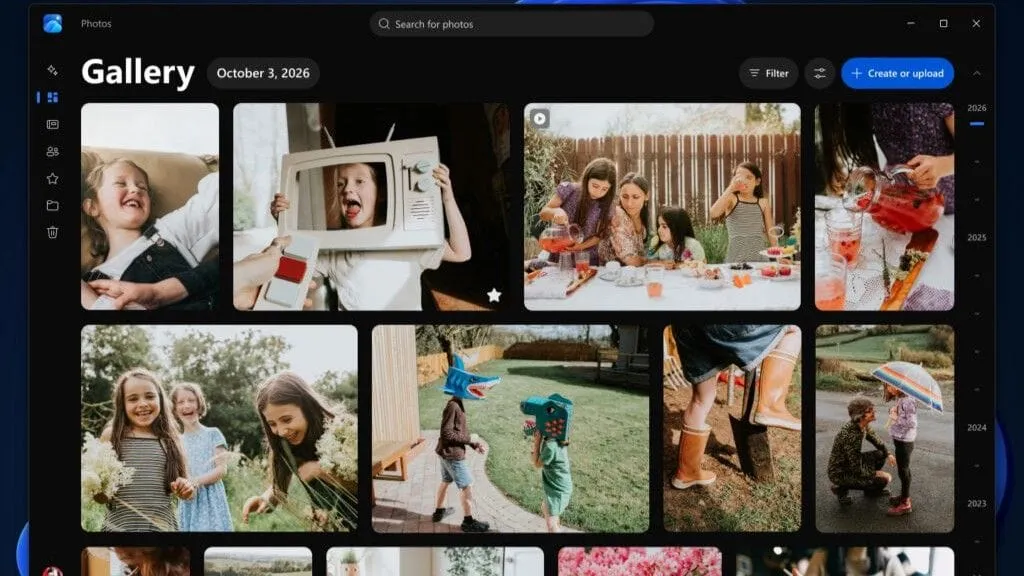
The new experience is built around three core components: a revamped Gallery, a powerful Editor, and a dynamic Viewer. Microsoft’s goal is clear: to help users rediscover, organize, and edit their collections with tools that are both deeply capable and incredibly fast.
At the heart of this change is the new Gallery, which acts as a unified hub for all your visual content. It seamlessly pulls photos from your PC, OneDrive, and iCloud into a single, cohesive space. Forget endless searching through file names; the new Gallery lets you search using natural language, searching for concepts like “sunset at the beach” or filtering instantly by specific people or organized albums. It’s smart, intuitive, and puts control back in your hands.
Efficiency is another massive focus. The new Editor has been rebuilt from the ground up using the modern WinUI 3 framework, resulting in significant performance boosts. Microsoft reports that the Editor loads up to 25 percent faster, making editing a breath of fresh air. This speed improvement extends across the board, with the new Viewer launching 15 percent faster on average, and handling HEIC images up to 30 percent faster.
Beyond speed, the new tools introduce serious creative power. The Editor now offers robust tools for cropping, enhancing, repairing, and stylizing images. A standout feature is the addition of Relight, an advanced tool that allows users to dynamically adjust lighting in a photo by adding up to three light sources, adding a layer of professional-grade manipulation right to your desktop.
The new Viewer is equally impressive. It is now “native” to the Photos app, offering superior support for HDR viewing and expanded file types, including SVG, ensuring that high-quality images are displayed exactly as they were intended. It even features an edge-to-edge experience, allowing you to zoom into a photo and watch it take over the entire window.
This upgrade signals a commitment to making everyday photo management effortless. By combining lightning-fast performance with intelligent features—like natural language search and advanced editing options—Microsoft is delivering an experience that moves far beyond simple file viewing. It’s time to see how much more beautiful and efficient your photo collection can be.
Buy on Amazon
Credit
