Razer Kiyo V2 Pro Is this giant webcam right for you
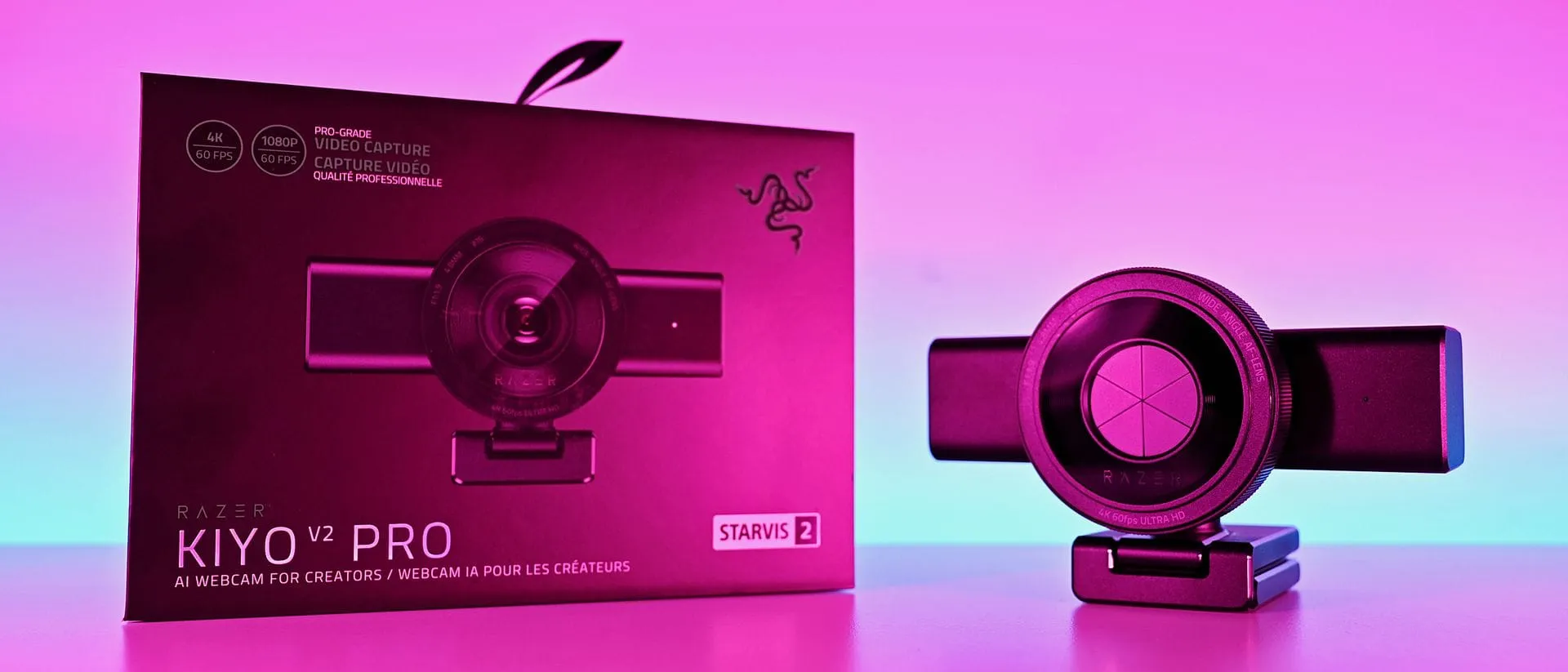
The world of content creation is constantly chasing the next big visual upgrade, and sometimes, the answer lies not in a massive processor, but in a high-end webcam. Enter the Razer Kiyo V2 Pro—a device positioned not just as a camera, but as a serious piece of hardware designed for the demanding life of a digital creator.
This is not your average webcam. It’s a $300 investment that aims for mirrorless-level quality while maintaining the convenience of a plug-and-play setup. It targets professionals who demand superior video performance without wanting to navigate the complex world of full-frame cameras.
At its core, the Kiyo V2 Pro packs some serious photographic muscle. It utilizes an 8.3 MP Sony STARVIS™ 2 sensor, paired with a 24 mm focal length, giving users the freedom to capture stunning 4K footage at up to 60 FPS. This capability alone gives creators a significant edge, especially when they need to capture smooth, fluid motion without motion blur.
Beyond the raw video performance, the design is equally compelling. The camera features a unique built-in ring light, instantly setting a professional mood for any stream or call. For privacy-conscious creators, the physical privacy shutter is a genuinely satisfying tactile feature. You twist the ring, and the blades slide across, offering a satisfying sense of control over who sees what.
The physical design is substantial. It features an L-shape mount base, which allows for easier adjustments without constantly wrestling with tripods, and a sturdy body weighing in at 380 grams. While this size makes it less portable than some competitors, the mounting options are designed for the serious setup—the kind of fixed position that content creators prefer.
However, turning a camera into a powerful tool requires more than just great hardware; it demands fine-tuning. While the specifications promise ease of use, maximizing the potential of the Kiyo V2 Pro relies heavily on external software, specifically Camo Studio, which is included with the device.
This external dependency means the experience falls slightly outside the simple plug-and-play magic Razer usually promises. To unlock the full potential, users need to dive into settings for ISO, exposure, and white balance—essentially becoming a photographer behind the camera. Yet, this deep control is where the real reward lies, allowing users to craft personalized visual profiles for everything from high-quality work calls to cinematic game broadcasts.
Furthermore, the integration is smart. Users can build custom profiles, optimizing settings for different uses, such as setting a 1080p profile for meetings and a 1440p profile for gaming recordings. This flexibility means the hardware serves as an exceptional foundation, capable of delivering superior results.
There is, of course, a caveat to consider: powering the webcam smoothly can sometimes be a headache. While it works flawlessly with the original Razer cable, some users have reported power instability with other USB-C cables. Razer has advised that a minimum USB 3.2 specification USB-C cable is necessary for reliable performance, so checking your peripherals is crucial.
Ultimately, should you invest in the Razer Kiyo V2 Pro? It’s not a simple yes or no answer. It is a specialized tool. It excels for content creators who prioritize cutting-edge video capabilities, including 4K60, and who are willing to spend a little time dialing in the settings. If you are looking for a camera that pushes the boundaries of what a webcam can do, and you are ready to embrace the power of manual control, the Kiyo V2 Pro is a serious contender. It may not look as polished as a dedicated mirrorless camera, but its ability to deliver professional-grade video quality at a competitive price point makes it a highly compelling choice.
Buy on Amazon
Credit
