3 Windows 11 tweaks for a faster cleaner and more personal OS
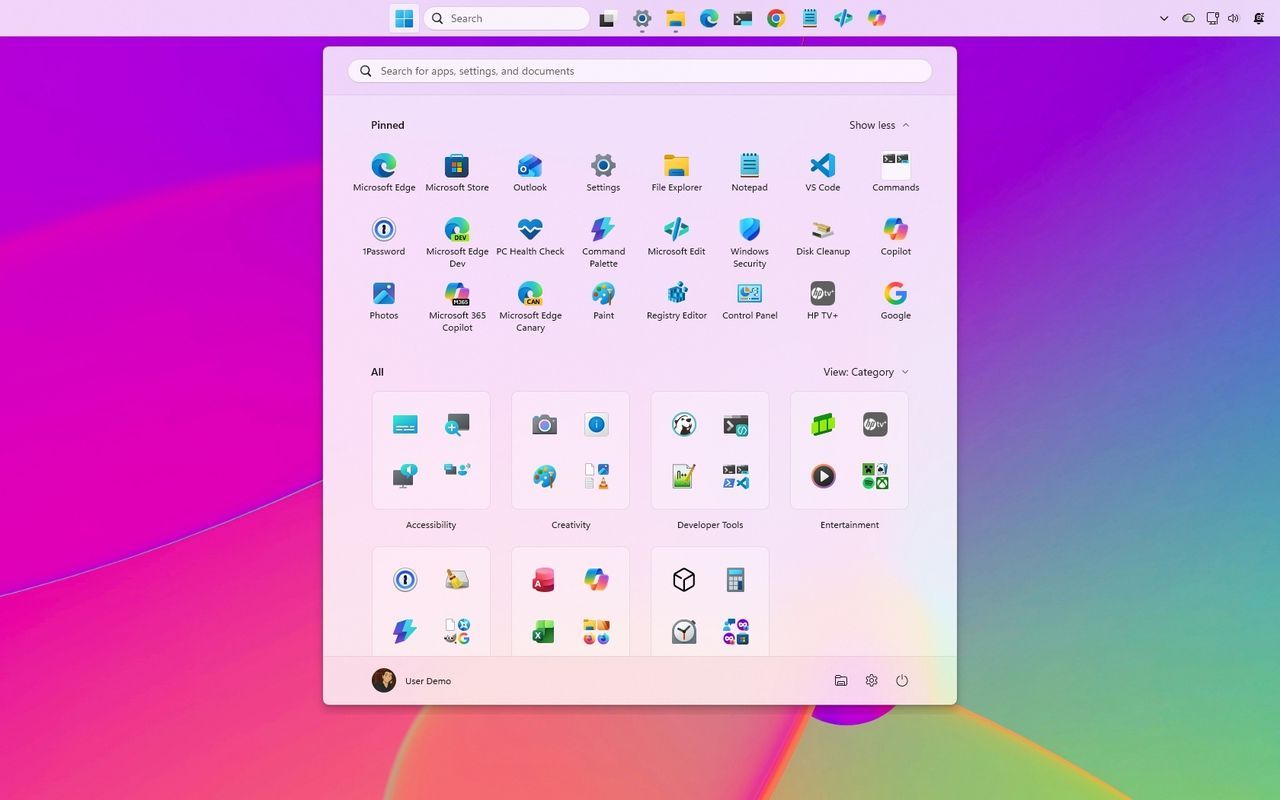
We spend countless hours navigating our operating systems, yet how often do we feel like we have true control over the tools we use? Microsoft is stepping up its game with the September 2026 update, rolling out a suite of customization features that aim to liberate Windows 11 from its default constraints, giving users the reins to truly personalize their desktop experience.
This isn’t just a minor tweak; it’s a fundamental shift toward user-centric design. The focus is on making the desktop feel less like a rigid framework and more like a canvas tailored to individual workflows. Ready to take back control? Let’s dive into the features coming your way.
Moving the Action Bar
One of the most immediately impactful changes allows users to completely redefine the placement of the Taskbar. Gone are the days of fixed positioning. Now, you have the freedom to move the Taskbar to the very top of your screen, or adjust its size to maximize your desktop real estate. This flexibility is a huge win for power users who prefer a cleaner, more spacious setup.
Beyond simple positioning, users can opt for a smaller Taskbar size to free up valuable screen space for applications and content. While moving the Taskbar to the left is also an option, many users found that docking it to the side inadvertently shifted the Notification Center, leading to visual clutter. This new control lets you decide exactly how your workspace is organized.
Personalizing the Start Menu
The Start menu, often viewed as the central hub of the operating system, is also getting a much-needed makeover. Microsoft is finally giving users granular control over this essential interface. You can now adjust the overall size of the Start menu and fine-tune which sections appear, allowing you to hide profile names and pictures entirely for a more focused, private experience.
This level of detail means the Start menu can adapt to your needs, whether you prefer a compact, minimalist interface or one packed with custom shortcuts. Users also have the option to customize the display of recent files and suggestions, ensuring the menu serves your workflow rather than imposing a one-size-fits-all design.
Taming the Search Results
Perhaps the most subtle yet powerful change is the overhaul of the Windows Search experience. Microsoft is removing the constant presence of external suggestions, offering users a cleaner, more focused search environment. By toggling off web results and Microsoft Store app suggestions, users can ensure that when they search for a file, setting, or application, the results focus purely on what they need, not on external advertising or unwanted links.
The resulting search experience is streamlined: results will clearly indicate whether an item is a file, an app, a setting, or a web result. Furthermore, the system is being optimized to automatically index frequently used folders, making file retrieval faster and more intuitive. These changes don’t just make the operating system look better; they make it feel fundamentally more responsive and personal.
These updates confirm Microsoft’s commitment to making Windows 11 an adaptable tool, not a rigid mandate. By introducing these customizable options gradually, Microsoft is empowering users to shape their digital environment exactly how they need it. It’s a testament to the idea that sometimes, the best features are the ones that give the user ultimate control over their own screen.
Buy on Amazon
Credit
