8 changes in Windows 11 Insider builds reveal Microsoft’s next phase
The Windows Insider Program is constantly buzzing with change, and the latest waves offer a fascinating look at how Microsoft is actively refining the operating system. While some phases involve waiting for previews, the recent updates are delivering substantial, user-focused improvements that signal a clear move toward greater flexibility and control for Windows 11 users.
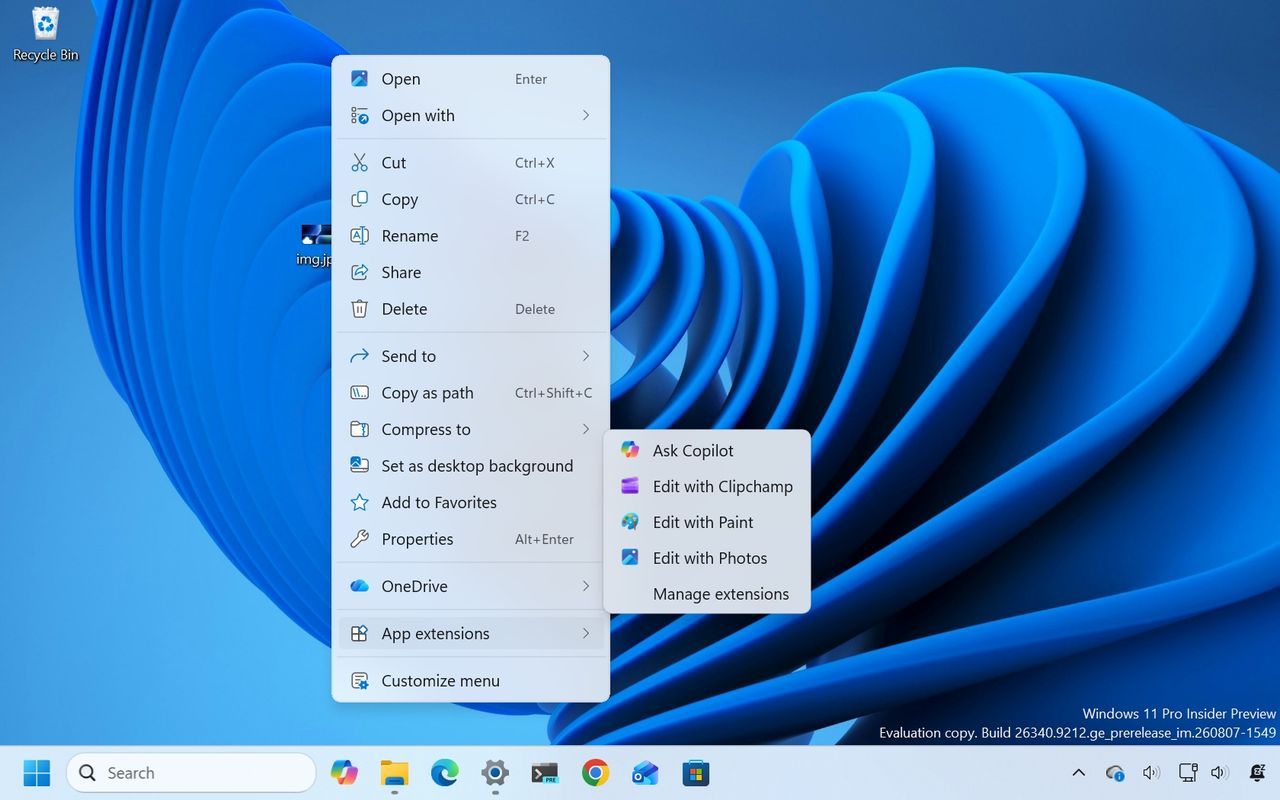
One of the most immediately noticeable upgrades is the complete redesign of the context menu. This isn’t just a cosmetic tweak; it’s a fundamental shift aimed at giving users more power over their workflow. The new menu is simpler, faster, and, most importantly, fully customizable. Users can now tailor the menu by choosing which actions appear in the main view, and they can organize primary actions like cut and paste vertically, addressing the long-standing frustration of rigid, system-enforced layouts.
New entry points, such as an “App extensions” submenu, allow users to access application-specific functions directly from the context menu, streamlining navigation and reducing clutter. This design acknowledges that users don’t need a one-size-fits-all experience, offering options like restoring classic menu entries or utilizing keyboard shortcuts to maintain familiarity when desired.
Beyond interface tweaks, Microsoft has been diligently polishing the background experience. Improvements have been made to the desktop background settings, allowing for more reliable previews that render in higher resolution, particularly on portrait monitors. Users can now manage desktop slideshows more dependably, and the system can even utilize Device-Independent Bitmap files, offering creative options for wallpaper that persist across multiple desktops.
The quality-of-life enhancements extend to daily operations. File Explorer has received a notable boost, with the “Home” page launching faster and the “Recommended” section now supporting touch scrolling, making file browsing in the carousel much more intuitive. Furthermore, the system is making it easier to secure personal memories by integrating Camera Roll backup directly with OneDrive, providing a seamless solution for protecting photos and videos from mobile devices.
Even tools once considered core to the system are being phased out to push users toward modern solutions. The legacy Windows Management Instrumentation Command-line (WMIC) tool is no longer shipped, focusing the system on newer management methods. Similarly, the legacy Drop Tray feature is being retired following user feedback, signaling a commitment to evolving the operating system away from older conventions.
Under the hood, the operating system is also receiving crucial infrastructural upgrades. The Windows Recovery Environment (WinRE) is now significantly more robust, featuring networking enhancements that allow recovery workflows, such as cloud rebuilds, to connect automatically to networks without requiring manual input of Wi-Fi credentials. This update ensures that recovery processes are smoother and less reliant on manual configuration.
Finally, even visual elements are being refined. The Magnifier interface has been refreshed with cleaner icons and refined spacing for a more polished look. While subtle, these cumulative changes—from a flexible context menu to smarter file management and improved recovery tools—demonstrate Microsoft’s commitment to providing Windows 11 with the flexibility and polish its users deserve.
Buy on Amazon
Credit
