Protect your PC: 6 new Windows 11 Insider features arriving soon
The Windows Insider Program is constantly pushing the boundaries of what’s possible, and the latest preview builds are proving that Microsoft isn’t just adding features—they are fundamentally rethinking how we interact with our operating systems. In the recent updates for July 2026, these previews offer a delightful mix of major recovery enhancements, sleek design upgrades, and deeply satisfying improvements to core functions.
One of the most transformative additions is the introduction of Cloud rebuild. This new recovery feature eliminates the stress associated with reinstalling Windows 11 when a system won’t boot. Instead of relying on cumbersome bootable USB drives or custom recovery images, users can now access installation files and drivers directly through the cloud. Simply by navigating the Windows Recovery Environment and selecting this option, a clean operating system install is ready to go—downloaded seamlessly and securely over a network connection.
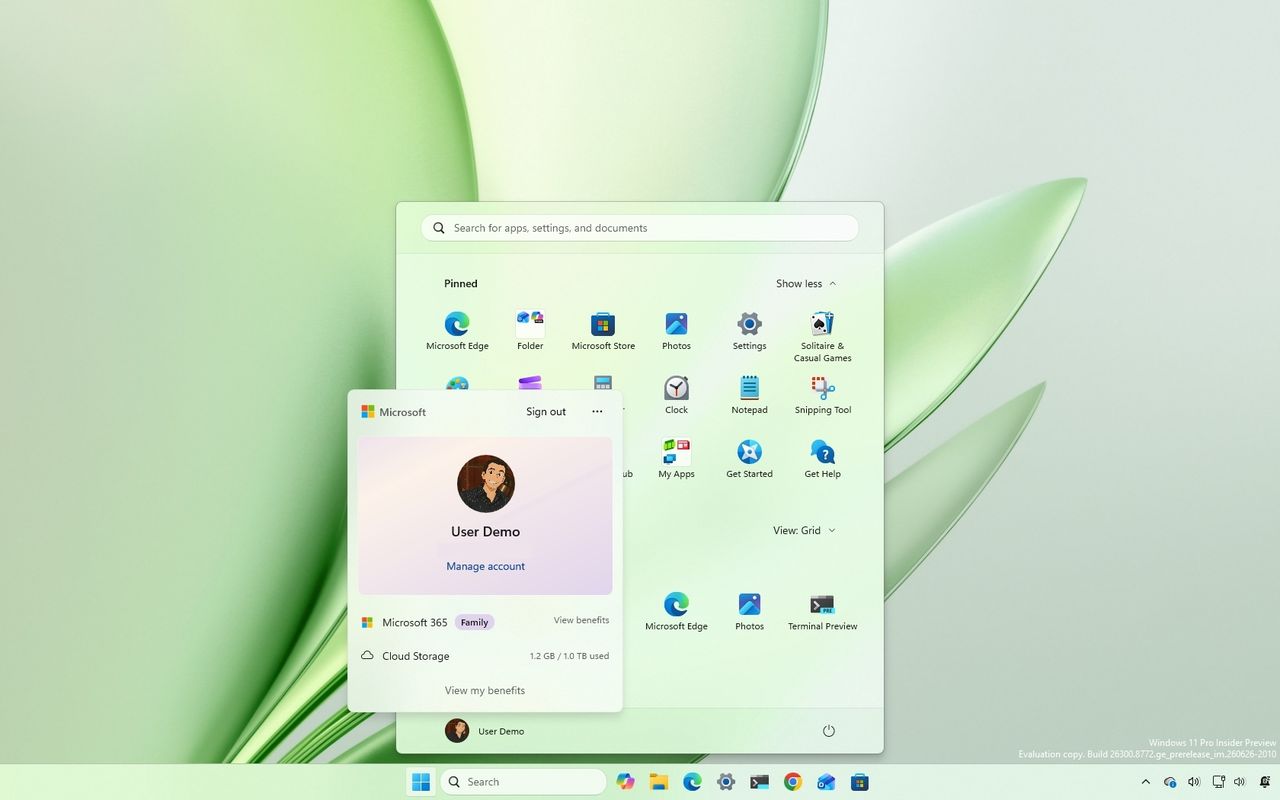
Beyond powerful recovery tools, Microsoft is focusing heavily on refining the daily user experience. The Start menu has received a fresh facelift with the Account Control flyout redesign, offering a more modern aesthetic that clearly highlights essential information like Microsoft 365 subscriptions and cloud storage access, making account management intuitive and visible.
Flexibility for power users is also back on the table with the reintroduction of Taskbar customization. Users can now control the location and size of the taskbar, moving it to the top, left, or right edges of the screen. This allows personalization that many long-time Windows users have been waiting for, ensuring the interface adapts to how you prefer to work.
Efficiency is another major theme. The company has introduced a unified Windows Update experience designed to streamline maintenance. By coordinating monthly quality updates with necessary driver and firmware patches into a single installation cycle whenever possible, Microsoft aims to drastically reduce the number of disruptive restarts users encounter each month, setting a long-term goal for just one reboot per month.
For educational environments, Windows 11 is becoming more accessible through a generous offer: devices running Windows 11 Home can now upgrade to Windows 11 Pro Education at no extra cost. This move provides schools with the flexibility they need to manage modern infrastructure efficiently while ensuring that any rollback remains possible via a clean OS installation.
Perhaps the most satisfying changes are those focused on making the operating system itself smarter and less cluttered. The new Windows Search experience is decluttered, focusing the home screen purely on recent searches, eliminating visual clutter and advertisements. More importantly, it prioritizes local results—meaning when you search for settings or local files, the system now surfaces these relevant items above web and store content, enhancing speed and relevance.
These updates demonstrate Microsoft’s commitment to iterating on Windows 11, focusing less on simply adding features and more on refining the experience. From effortless recovery methods to smarter search functionality, the recent Insider builds are successfully addressing long-standing user frustrations while delivering a genuinely smoother, more powerful computing experience.
Buy on Amazon
Credit
