
Hands-on with AltTabby the new Windows 11 Alt+Tab experience
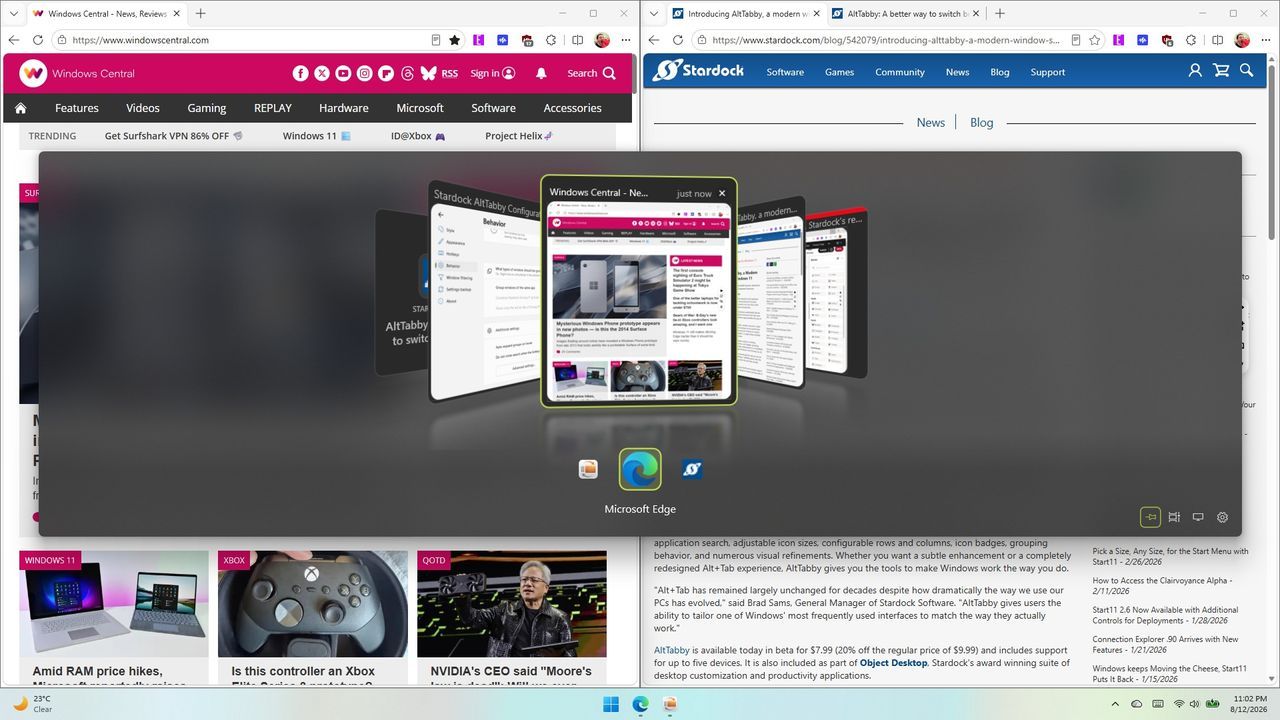
The simple act of switching applications—the familiar press of Alt+Tab—has long been an unspoken, reflexive gesture in the Windows environment. But for many power users, this fundamental function often feels less like efficient navigation and more like a frustrating, uncustomizable chore. Enter AltTabby, a new utility from Stardock that is redefining how we handle application switching on Windows 11 by injecting flexibility and deep customization into a core operating system feature.
AltTabby isn’t just another shortcut; it’s an overhaul of the app switcher. It moves beyond the default experience, offering users a suite of features designed to transform a simple transition into a tailored workflow. This enhanced functionality includes support for customizable layouts, smart grouping capabilities, application pinning, and intuitive keyboard shortcuts that make multitasking smoother than ever before.
The real magic of AltTabby lies in its adaptability. Instead of forcing users into one rigid structure, the application allows you to tailor the experience exactly to how you work. Users can choose from five distinct views, each offering a different perspective on their open windows. One favorite among those testing the utility is the carousel view, which offers a natural, flowing navigation experience that feels intuitively smooth as you switch between tasks.
While some layouts prioritize minimalism, others offer comprehensive information, and AltTabby accommodates both. While some found the icons view too compact, offering a clean design with a helpful search box at the top, others opted for the fluid carousel approach, appreciating its natural flow and the ability to customize elements like window colors directly within the switcher.
To further enhance the experience for power users juggling multiple screens, AltTabby introduces smart organizational features. It can learn your most frequently used windows and prominently display them, or it can simply sort all open applications by their recent usage history. Furthermore, if you operate across multiple monitors, AltTabby offers options to manage which applications appear across all displays or focus strictly on the current screen.
For those who rely heavily on keyboard shortcuts, AltTabby provides thoughtful features that address common sticking points. For instance, a useful option is the ability to “Keep AltTabby interface open when hotkeys are released.” This allows the switcher to remain visible on the screen until you actively click elsewhere, ensuring you never lose sight of your current view.
By refreshing a classic Windows interface with new looks, expanded functionality, and deep customization options, Stardock’s AltTabby proves that even the most mundane system functions can be significantly improved. It transforms the often-annoying Alt+Tab into an engaging, personalized tool, offering users the control they need to master their multitasking environment.
Credit

